# Check the delivery status of a message in Make
> Look up whether a WhatsApp message you sent from a Make scenario was delivered, read or failed, and send a fallback when it did not arrive.
The **Get delivery status of a message** search module of the Whatsable app looks up a message you sent and returns its status: sent, delivered, read, or failed. It does not send anything.
Use it for a fallback: when a message did not arrive, for example because the number is not on WhatsApp, send an email or alert your team instead. This page is the how-to guide. For the API key and the other modules, see the [Make overview](/integration/make).
## When to use it
- **Email fallback**:
Send the same information by email when the WhatsApp message failed.
- **Clean your lists**:
Flag a lead in your CRM when its number cannot receive WhatsApp messages.
## Set up the module
**Send the message first**
The scenario needs a **Whatsable: [Send a WhatsApp Message](/integration/make/send-message)** module before this one. That module returns the `message_id` this search needs.
**Wait for WhatsApp**
Add Make's **Tools → Sleep** module after the send, or check the status in a later scenario run. WhatsApp reports delivery a little after the send, so a check right away usually still shows `sent`.
**Add the module**
Click **+**, search for **Whatsable**, open the **Whatsable** app with the **Verified** badge, and choose **Get delivery status of a message**. Under **Connection**, choose a connection with the same API key that sent the message.
**Map the message ID**
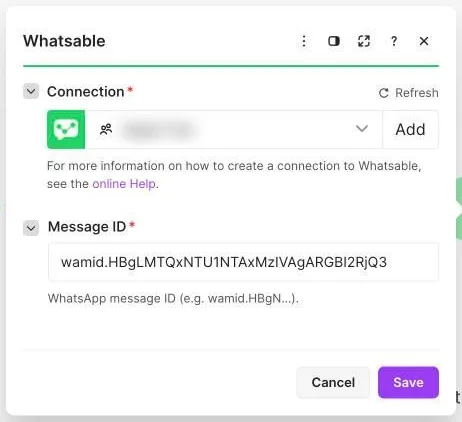 *The only field: the WhatsApp message ID*
**Message ID** `text` (required)
The WhatsApp message ID, which starts with `wamid.`. Map `message_id` from the Send a WhatsApp Message module.
**Branch on the status**
Add a **Router** with a filter on `status`. Continue your main flow when it is `delivered` or `read`. Send the fallback when it is `failed`.
## What the module returns
| Field | Meaning |
| --- | --- |
| `status` | `pending`, `sent`, `delivered`, `read`, or `failed` |
| `message_id` | The WhatsApp message ID you looked up |
| `send_time` | When Whatsable recorded the message, as a Unix time in milliseconds |
| `delivered_time` | When the message was delivered, in milliseconds, or `null` |
| `read_time` | When the contact read the message, in milliseconds, or `null` |
| `phone_number` | The contact's number as a number, or `null` when the number does not fit a JSON number |
| `send_by` | `operator`, `broadcast`, `broadcast_test`, `api`, `bot`, `proactive`, or `whatsapp_app` |
| `system_user` | The sender's name, or `null` |
> [!NOTE]
>
> A message that was never delivered can stay on `sent`. WhatsApp sets `read` only when the contact has read receipts turned on, so `delivered` is the safe sign that the message arrived.
## Limits
- The module finds only messages sent from the WhatsApp number of the connection's API key. For any other ID, it fails with "No message with this id was sent from this API key's WhatsApp number."
- It does not work with [Schedule a follow-up WhatsApp Message](/integration/make/schedule-message): that module returns no message ID, because the message is not sent yet.
- It does not return the reason a message failed, only the `failed` status.
## Troubleshooting
No message with this id was sent from this API key's WhatsApp number
Check that you mapped `message_id` from a Send a WhatsApp Message module, and that both modules use the same API key.
The status is always sent
The check ran before WhatsApp reported delivery. Wait longer before the check.