> ## Documentation Index
> Fetch the complete documentation index at: https://docs.whatsable.app/llms.txt
> Use this file to discover all available pages before exploring further.
# Incoming Messages
> Receive and manage real-time WhatsApp message notifications via webhooks
Incoming message webhooks deliver real-time notifications when your recipients reply, enabling immediate responses and interactive conversations through WhatsApp.
The Incoming Messages system provides a robust webhook infrastructure that enables your application to receive and process WhatsApp messages from your recipients in real-time. This guide covers how to configure, manage, and handle incoming message webhooks.
## Overview
Webhooks are HTTP callbacks that deliver notifications to your server whenever specific events occur - in this case, when recipients reply to your WhatsApp messages. Benefits include:
* **Real-time processing** of customer responses
* **Seamless integration** with your existing systems
* **Automated workflows** triggered by customer messages
* **Enhanced customer experience** through timely interactions
## Webhook Configuration
### Managing Endpoints
Navigate to the Developer section in your dashboard sidebar to manage webhook configurations.
Add a new webhook URL where you want to receive incoming message notifications.
### Endpoint Requirements
All webhook endpoints must be publicly accessible via HTTPS and configured to accept POST requests with JSON payloads. HTTP endpoints are not supported in production environments.
Your webhook endpoint must:
1. Accept HTTP POST requests
2. Process JSON payloads
3. Return a 2xx status code within 10 seconds
4. Implement idempotency handling (see best practices below)
## Webhook Payload
When a user replies to your WhatsApp message, we'll send a POST request to your configured endpoint with a detailed payload.
### Sample Payload
```json Incoming Text Message theme={null}
{
"last_messages": [
{
"type": "user",
"content": "Thank you for the quick response. Can you provide more details about your premium service plans?",
"timestamp": "2025-06-09T22:08:11.990Z",
"content_type": "text"
},
{
"type": "bot",
"content": "I'd be happy to help you explore our premium service options. Let me connect you with a specialist who can provide detailed information.",
"timestamp": "2025-06-09T21:45:30.417Z",
"content_type": "text"
}
],
"conversation_paragraph": "User (10:08:11 PM): Thank you for the quick response. Can you provide more details about your premium service plans? ; Bot (9:45:30 PM): I'd be happy to help you explore our premium service options. Let me connect you with a specialist who can provide detailed information.",
"phone_number": "14155552671",
"recipient_name": "Sarah Johnson",
"user_id": "9232fcef-a570-4a2c-b46b-6cab53aec304",
"last_message_of_user": "Thank you for the quick response. Can you provide more details about your premium service plans?",
"last_message_of_bot": "I'd be happy to help you explore our premium service options. Let me connect you with a specialist who can provide detailed information.",
"message_type": "text",
"user_last_message_time": 1749506891,
"bot_last_message_time": 1749504330,
"attachment_url": null,
"note": "",
"note_automation": "",
"labels": "sales, premium-inquiry"
}
```
```json Incoming Media Message theme={null}
{
"last_messages": [
{
"type": "user",
"content": "",
"timestamp": "2025-06-09T14:05:12.000Z",
"content_type": "document",
"media_url": "https://api.insightssystem.com/vault/LSMumRx1/VR-1aHOci6nP28eHWHJH7JauJkc/Ew7R9w../contract_proposal_v2.pdf"
},
{
"type": "bot",
"content": "Please upload the signed contract document when ready, and I'll process it immediately.",
"timestamp": "2025-06-09T14:03:20.000Z",
"content_type": "text"
}
],
"conversation_paragraph": "User (2:05:12 PM): [Document] ; Bot (2:03:20 PM): Please upload the signed contract document when ready, and I'll process it immediately.",
"phone_number": "14155552671",
"recipient_name": "Sarah Johnson",
"user_id": "9232fcef-a570-4a2c-b46b-6cab53aec304",
"last_message_of_user": "", // For image, video & document files, this field contains the caption if provided
"last_message_of_bot": "Please upload the signed contract document when ready, and I'll process it immediately.",
"message_type": "document",
"user_last_message_time": 1749472312,
"bot_last_message_time": 1749472200,
"attachment_url": "https://api.insightssystem.com/vault/LSMumRx1/VR-1aHOci6nP28eHWHJH7JauJkc/Ew7R9w../contract_proposal_v2.pdf",
"note": "",
"note_automation": "",
"labels": "contracts, document-processing"
}
```
### Payload Fields
Array containing the recent messages in the conversation
Sender type ("user" or "bot")
Message content (empty for media messages)
ISO 8601 timestamp when the message was sent
Type of content (text, image, audio, video, document, location)
URL to media file if applicable (valid for 24 hours)
Human-readable summary of the recent conversation
The phone number of the recipient who sent the message
The name of the recipient if available
Unique identifier for the user in your system
The last message sent by the user
The last message sent by your system
The type of the latest message (text, image, audio, video, document, location)
Unix timestamp of the user's last message
Unix timestamp of your system's last message
URL to media file if the latest message contains media (null for text messages)
Custom note field for additional context
Automation-related notes
Comma-separated labels for categorizing the conversation
## Webhook Management API
You can programmatically manage your webhook endpoints using our API.
### Create Webhook Endpoint
`POST https://api.insightssystem.com/api:qh9OQ3OW/webhook/dev/create`
Register a new webhook endpoint to receive incoming message notifications. Send a valid **Bearer** token (same credential used for the dashboard).
#### Request Body
Full HTTPS URL of your endpoint.
Whether the webhook is enabled.
Incoming message trigger on/off.
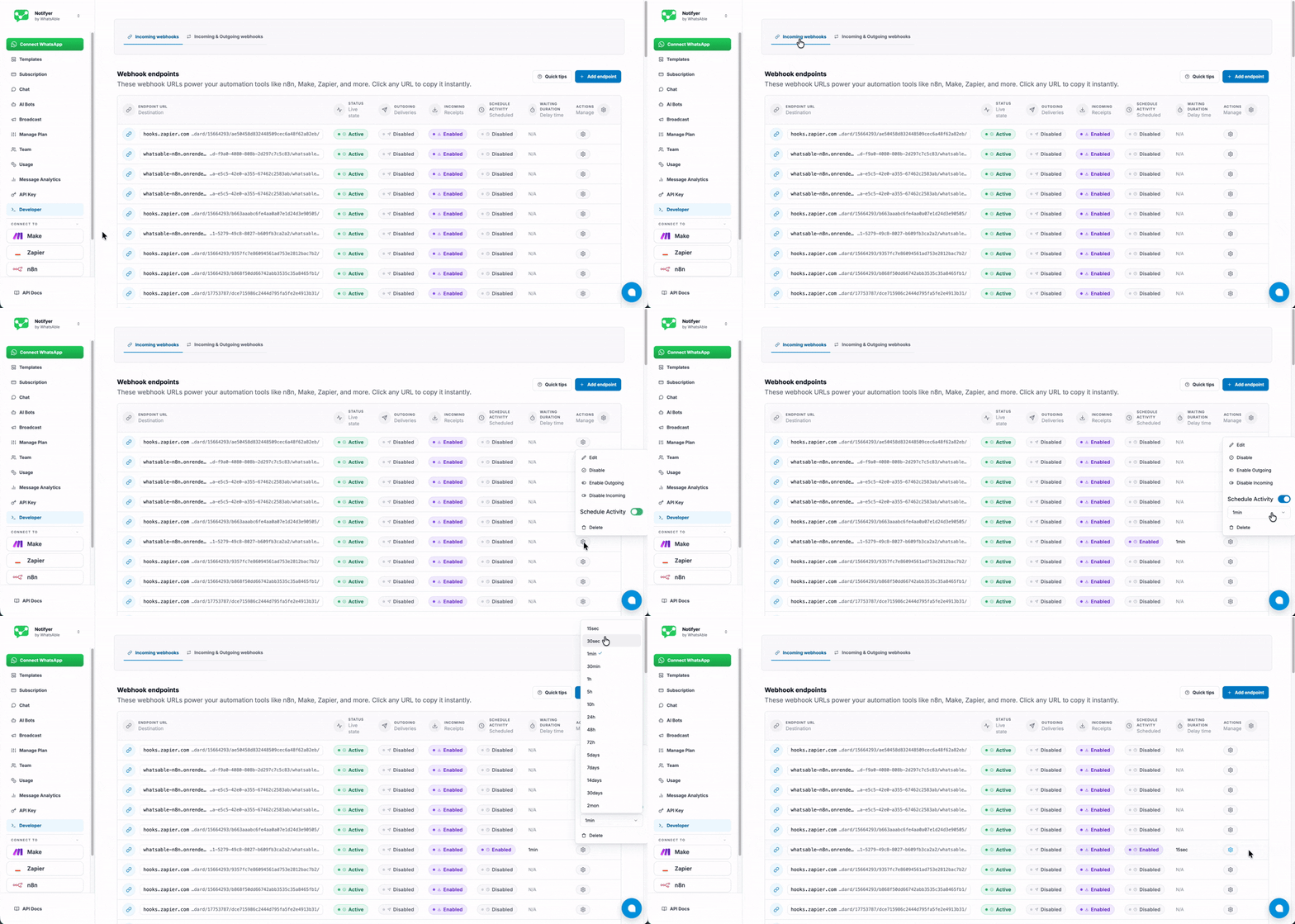
Schedule activity trigger on/off. When enabled, your bot can send multiple sequential messages with natural delays between them — useful for simulating human-like conversation flow.
**How to enable in the dashboard**
Navigate to **Incoming Webhooks**, click the settings icon next to your webhook, then enable **Schedule Activity**. A dropdown will appear where you can select your preferred delay duration between messages.
 **Example workflow**
When a user sends an incoming message, you can respond with a sequence of messages each sent after a specified delay:
```json theme={null}
{
"messages": [
{
"text": "Great! Let me check available slots for you...",
"delay": 0
},
{
"text": "I can see openings on Monday and Wednesday.",
"delay": 2000
},
{
"text": "Which day works better for you?",
"delay": 3500
}
]
}
```
Set `waiting_duration` to the maximum delay window you need. When `schedule_activity` is `false`, set `waiting_duration` to `0`.
How long (in **seconds**) to wait for schedule activity when `schedule_activity` is `true`. Set to `0` when schedule activity is off.
Dashboard presets: `15`, `30`, `60`, `1800`, `3600`, `18000`, `36000`, `86400`, `172800`, `259200`, `432000`, `604800`, `1209600`, `2592000`, `5184000` (15 seconds → 2 months). Prefer these values if mirroring the app UI.
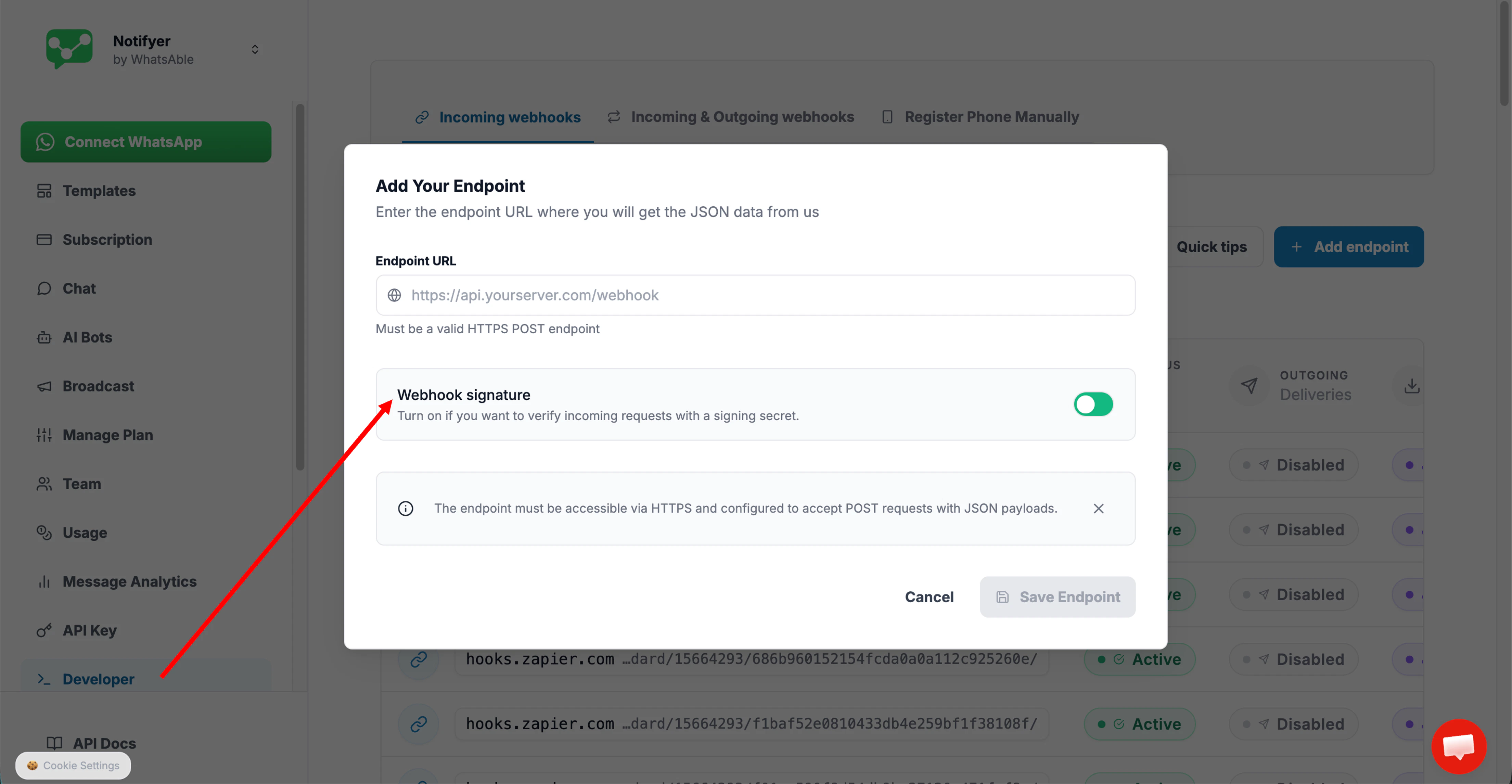
If `true`, enables request signing. The server returns a `signature_secret` **once** in the response — copy and store it immediately, as it will not be shown again.
**Example workflow**
When a user sends an incoming message, you can respond with a sequence of messages each sent after a specified delay:
```json theme={null}
{
"messages": [
{
"text": "Great! Let me check available slots for you...",
"delay": 0
},
{
"text": "I can see openings on Monday and Wednesday.",
"delay": 2000
},
{
"text": "Which day works better for you?",
"delay": 3500
}
]
}
```
Set `waiting_duration` to the maximum delay window you need. When `schedule_activity` is `false`, set `waiting_duration` to `0`.
How long (in **seconds**) to wait for schedule activity when `schedule_activity` is `true`. Set to `0` when schedule activity is off.
Dashboard presets: `15`, `30`, `60`, `1800`, `3600`, `18000`, `36000`, `86400`, `172800`, `259200`, `432000`, `604800`, `1209600`, `2592000`, `5184000` (15 seconds → 2 months). Prefer these values if mirroring the app UI.
If `true`, enables request signing. The server returns a `signature_secret` **once** in the response — copy and store it immediately, as it will not be shown again.
 ```bash cURL theme={null}
curl -X POST \
https://api.insightssystem.com/api:qh9OQ3OW/webhook/dev/create \
-H 'Content-Type: application/json' \
-H 'Authorization: Bearer YOUR_TOKEN' \
-d '{
"webhooks": "https://your-domain.com/api/webhooks/whatsapp",
"status": true,
"incoming": true,
"schedule_activity": false,
"waiting_duration": 0,
"active_signature": false
}'
```
```javascript Node.js theme={null}
const axios = require('axios');
async function createWebhook() {
try {
const response = await axios.post(
'https://api.insightssystem.com/api:qh9OQ3OW/webhook/dev/create',
{
webhooks: "https://your-domain.com/api/webhooks/whatsapp",
status: true,
incoming: true,
schedule_activity: false,
waiting_duration: 0,
active_signature: false
},
{
headers: {
'Content-Type': 'application/json',
'Authorization': 'Bearer YOUR_TOKEN'
}
}
);
console.log(response.data);
return response.data;
} catch (error) {
console.error('Error creating webhook:', error);
}
}
createWebhook();
```
```python Python theme={null}
import requests
url = "https://api.insightssystem.com/api:qh9OQ3OW/webhook/dev/create"
headers = {
"Content-Type": "application/json",
"Authorization": "Bearer YOUR_TOKEN"
}
data = {
"webhooks": "https://your-domain.com/api/webhooks/whatsapp",
"status": True,
"incoming": True,
"schedule_activity": False,
"waiting_duration": 0,
"active_signature": False
}
response = requests.post(url, headers=headers, json=data)
print(response.json())
```
#### Response
Returns a JSON object for the created webhook row.
Webhook ID.
Whether the webhook is enabled.
Incoming message trigger.
Outgoing message trigger.
Stored endpoint URL.
Unix timestamp in milliseconds.
Schedule activity wait time in seconds.
Schedule activity flag.
When `active_signature` was `true`: a **one-time** secret string — copy and store it immediately, it will not be retrievable again. When `active_signature` was `false`: `null`.
```json With Signature (active_signature: true) theme={null}
{
"id": 1205,
"status": true,
"incoming": true,
"outgoing": false,
"webhooks": "https://your-domain.com/api/webhooks/whatsapp",
"created_at": 1775471874139,
"signature_secret": "",
"waiting_duration": 0,
"schedule_activity": false
}
```
```json Without Signature (active_signature: false) theme={null}
{
"id": 1205,
"status": true,
"incoming": true,
"outgoing": false,
"webhooks": "https://your-domain.com/api/webhooks/whatsapp",
"created_at": 1775471874139,
"signature_secret": null,
"waiting_duration": 0,
"schedule_activity": false
}
```
When `active_signature` is `true`, the `signature_secret` is returned **only once** at creation time. Store it securely — it cannot be retrieved again. Use it to verify the authenticity of incoming webhook requests.
### Webhook Signature Verification
When a webhook is created with `active_signature: true`, every request our system sends to your endpoint will include an **`X-Webhook-Signature`** header. Use it to confirm the request genuinely came from us and was not tampered with.
| Header | Example value |
| --------------------- | ----------------------------------------------------------------------------------------------------------------------------------------------------------------------------- |
| `X-Webhook-Signature` | `RNEefV2V_tiDZeiOpeqMzWsR3X4zGOxIYARIF5-Ia2MXWIgT48jO-M4A1-bgr9bxdoHy5vb7azy_Vd-Gsp4qoAVhQCVyWZxhD1ZNJTQi9VNezJ6C7mnPy--osqcDSq1bfjjppAXBlyenWIa8_506ez5Z92p-eGucalu3-1g6wOk` |
The value is derived from the `signature_secret` returned at creation time. Compare it in your endpoint handler to validate each incoming request.
If `active_signature` was `false` when the webhook was created, this header will **not** be present in requests sent to your endpoint.
Never log or expose your `signature_secret` in client-side code or public repositories. If it is compromised, delete the webhook and create a new one with a fresh secret.
## Troubleshooting
* Verify your endpoint is publicly accessible
* Check for HTTP 4xx or 5xx responses
* Ensure proper SSL certificate configuration
* Verify your webhook is enabled in the dashboard
Each endpoint URL must be unique. If you submit a `webhooks` URL that is already registered, the API will return a **"Same webhook exist"** error.
To resolve this:
* Check your existing webhooks in the **Developer → Incoming Webhooks** tab of the dashboard to confirm whether the URL is already registered.
* If you want to update settings on an existing webhook (e.g. toggle `incoming`, change `waiting_duration`), use the update/edit endpoint instead of re-creating it.
* If you genuinely need a fresh webhook at the same URL, delete the existing one first, then create a new one.
Our technical support team is available to assist with webhook configuration, payload handling, and integration questions.
```bash cURL theme={null}
curl -X POST \
https://api.insightssystem.com/api:qh9OQ3OW/webhook/dev/create \
-H 'Content-Type: application/json' \
-H 'Authorization: Bearer YOUR_TOKEN' \
-d '{
"webhooks": "https://your-domain.com/api/webhooks/whatsapp",
"status": true,
"incoming": true,
"schedule_activity": false,
"waiting_duration": 0,
"active_signature": false
}'
```
```javascript Node.js theme={null}
const axios = require('axios');
async function createWebhook() {
try {
const response = await axios.post(
'https://api.insightssystem.com/api:qh9OQ3OW/webhook/dev/create',
{
webhooks: "https://your-domain.com/api/webhooks/whatsapp",
status: true,
incoming: true,
schedule_activity: false,
waiting_duration: 0,
active_signature: false
},
{
headers: {
'Content-Type': 'application/json',
'Authorization': 'Bearer YOUR_TOKEN'
}
}
);
console.log(response.data);
return response.data;
} catch (error) {
console.error('Error creating webhook:', error);
}
}
createWebhook();
```
```python Python theme={null}
import requests
url = "https://api.insightssystem.com/api:qh9OQ3OW/webhook/dev/create"
headers = {
"Content-Type": "application/json",
"Authorization": "Bearer YOUR_TOKEN"
}
data = {
"webhooks": "https://your-domain.com/api/webhooks/whatsapp",
"status": True,
"incoming": True,
"schedule_activity": False,
"waiting_duration": 0,
"active_signature": False
}
response = requests.post(url, headers=headers, json=data)
print(response.json())
```
#### Response
Returns a JSON object for the created webhook row.
Webhook ID.
Whether the webhook is enabled.
Incoming message trigger.
Outgoing message trigger.
Stored endpoint URL.
Unix timestamp in milliseconds.
Schedule activity wait time in seconds.
Schedule activity flag.
When `active_signature` was `true`: a **one-time** secret string — copy and store it immediately, it will not be retrievable again. When `active_signature` was `false`: `null`.
```json With Signature (active_signature: true) theme={null}
{
"id": 1205,
"status": true,
"incoming": true,
"outgoing": false,
"webhooks": "https://your-domain.com/api/webhooks/whatsapp",
"created_at": 1775471874139,
"signature_secret": "",
"waiting_duration": 0,
"schedule_activity": false
}
```
```json Without Signature (active_signature: false) theme={null}
{
"id": 1205,
"status": true,
"incoming": true,
"outgoing": false,
"webhooks": "https://your-domain.com/api/webhooks/whatsapp",
"created_at": 1775471874139,
"signature_secret": null,
"waiting_duration": 0,
"schedule_activity": false
}
```
When `active_signature` is `true`, the `signature_secret` is returned **only once** at creation time. Store it securely — it cannot be retrieved again. Use it to verify the authenticity of incoming webhook requests.
### Webhook Signature Verification
When a webhook is created with `active_signature: true`, every request our system sends to your endpoint will include an **`X-Webhook-Signature`** header. Use it to confirm the request genuinely came from us and was not tampered with.
| Header | Example value |
| --------------------- | ----------------------------------------------------------------------------------------------------------------------------------------------------------------------------- |
| `X-Webhook-Signature` | `RNEefV2V_tiDZeiOpeqMzWsR3X4zGOxIYARIF5-Ia2MXWIgT48jO-M4A1-bgr9bxdoHy5vb7azy_Vd-Gsp4qoAVhQCVyWZxhD1ZNJTQi9VNezJ6C7mnPy--osqcDSq1bfjjppAXBlyenWIa8_506ez5Z92p-eGucalu3-1g6wOk` |
The value is derived from the `signature_secret` returned at creation time. Compare it in your endpoint handler to validate each incoming request.
If `active_signature` was `false` when the webhook was created, this header will **not** be present in requests sent to your endpoint.
Never log or expose your `signature_secret` in client-side code or public repositories. If it is compromised, delete the webhook and create a new one with a fresh secret.
## Troubleshooting
* Verify your endpoint is publicly accessible
* Check for HTTP 4xx or 5xx responses
* Ensure proper SSL certificate configuration
* Verify your webhook is enabled in the dashboard
Each endpoint URL must be unique. If you submit a `webhooks` URL that is already registered, the API will return a **"Same webhook exist"** error.
To resolve this:
* Check your existing webhooks in the **Developer → Incoming Webhooks** tab of the dashboard to confirm whether the URL is already registered.
* If you want to update settings on an existing webhook (e.g. toggle `incoming`, change `waiting_duration`), use the update/edit endpoint instead of re-creating it.
* If you genuinely need a fresh webhook at the same URL, delete the existing one first, then create a new one.
Our technical support team is available to assist with webhook configuration, payload handling, and integration questions.